
Features
Create powerful AI tools and workflows in Turingpaper using custom agents, prompts, and a wide selection of prebuilt tools. With just one click, you can securely enable remote MCP access, allowing you to connect from popular AI apps like ChatGPT, Claude, Cursor, and Windsurf directly to your Turingpaper projects — so you can use and control your workflows from the tools you already rely on.
 Remote MCP Server
With Turingpaper, every project can be enabled as a remote MCP server with just one click. This allows your projects — built from agents, prompts, and prebuilt tools — to be used as tools in popular AI apps like Claude Desktop, Cursor, and others that support remote MCP servers. Your Turingpaper automations become accessible directly in your favorite AI apps.
- No need to understand the Model Context Protocol specification
- No need to modify your projects as new version of the Model Context Protocol are released
- Integrate your custom AI automations with external tools and desktop apps
- Reuse and control your automations wherever you work — no need to switch platforms
- Instantly connect and deploy new solutions across teams
- Expand Turingpaper's value beyond the studio, seamlessly bridging your projects with the broader AI ecosystem
- Every Turingpaper project is a ⚡ Remote MCP server
Prompts
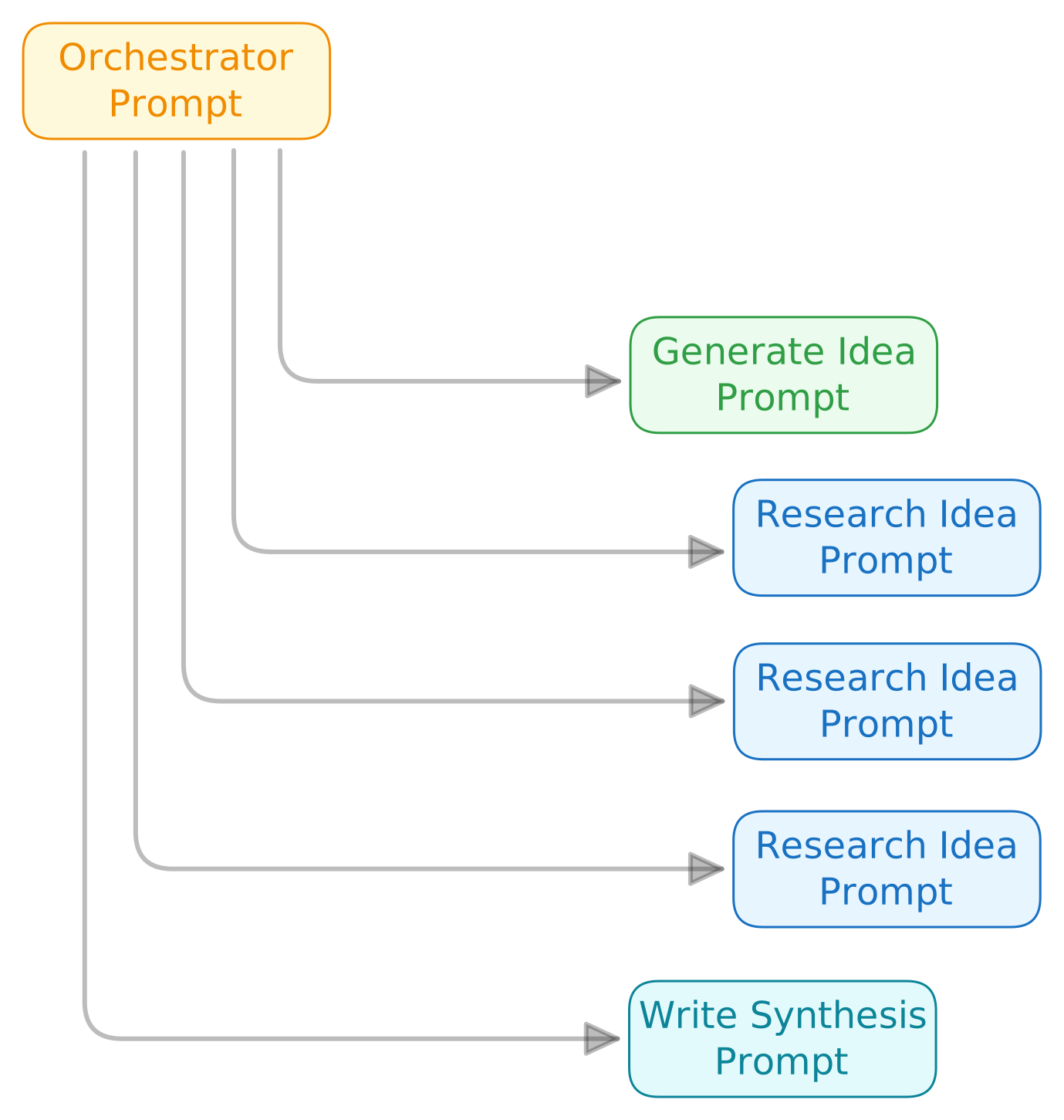
Prompts in Turingpaper are natural language instructions that automatically become reusable tools for your AI agents. You can build, chain, and update powerful workflows without any coding by breaking tasks into modular steps.
- Easily create, adapt, and scale automations with clear, no-code instructions
- Build flexible workflows that are simple to maintain and update
- Increase reliability and reusability by making each step modular and sharable
Agents
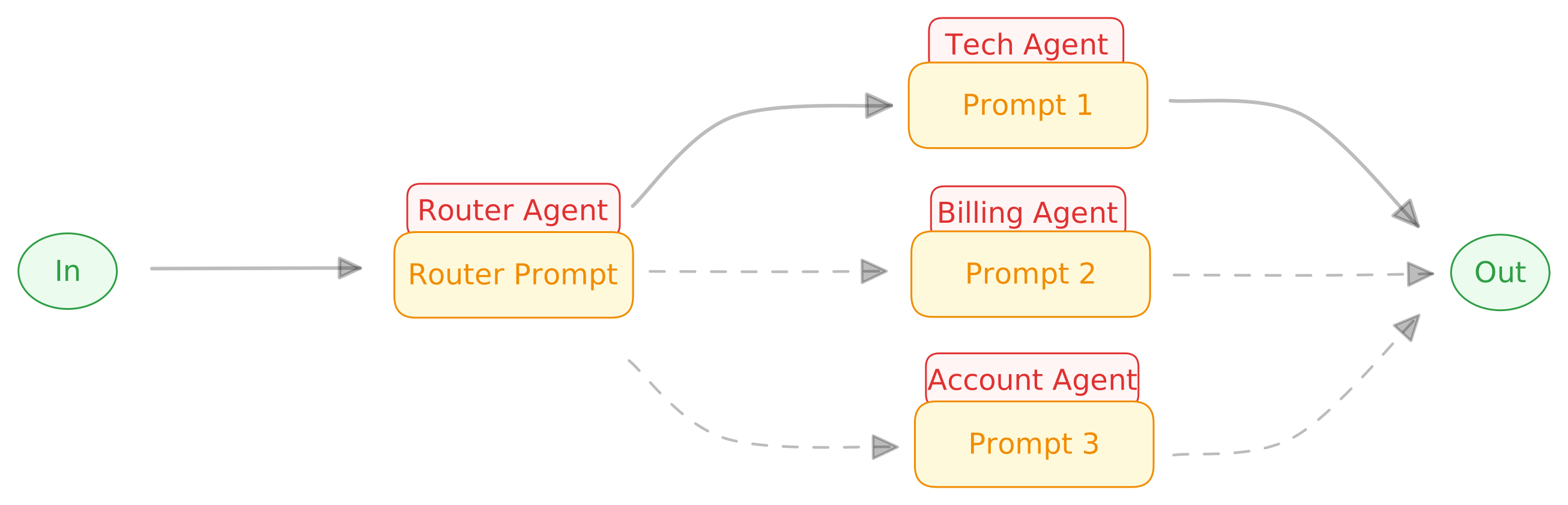
Agents in Turingpaper are large language models like GPT-4.1 or o3, equipped with clear, domain-specific instructions and controlled access to tools. You can use the built-in Generalist agent or create your own, setting each agent to handle particular prompts in your projects.
- Assign the best AI model for each prompt to improve accuracy and reliability
- Keep workflows organized by separating general instructions (agents) from specific tasks (prompts)
- Customize and reuse agent instructions across multiple prompts for greater flexibility and maintainability
Files
With Turingpaper's file tools, you can manage files of all types within your projects. Tools like
file_create, file_read, and file_edit let you create, access, and modify files in your AI workflows.- Easily organize and automate file operations as part of any workflow
- Work seamlessly with a wide variety of file types through a consistent set of tools
- Keep all your important project files in one place for streamlined management and automation
Working with Documents
With Turingpaper, you can upload binary documents like PDFs, DOCX, and PPTX files. The platform automatically extracts and converts the content into Markdown format, making the text fully accessible with normal file tools like
file_read and file_search.- Easily search, summarize, and process the contents of presentations, reports, and written documents
- Seamlessly use document content in your workflows without manual conversion
- Save time and reduce errors by having all text immediately available for AI-powered tasks
Working with Audio
With Turingpaper, you can upload audio files in formats like MP3, WEBM, or M4A, and the platform automatically transcribes them into SRT text files. This makes audio content directly accessible with normal file tools like
file_read and file_search.- Quickly convert voice recordings into text without manual effort
- Analyze, summarize, and use spoken content in your automations
- Seamlessly integrate audio data into your workflows for enhanced productivity
Internet
Turingpaper offers robust Internet tools like
internet_search, fetch_content, fetch_links, and fetch_file, allowing your AI agents to find and interact with information from the web and online sources. These tools enable you to search, scrape, collect links, and download files or Wikipedia articles directly into your projects.- Effortlessly bring real-time web data into your workflows
- Streamline tasks like web scraping, link collection, and downloading reference materials
- Keep your workflows connected to the latest online information
Images
Turingpaper lets you generate, edit, and analyze images with tools like
image_gen, image_edit, and image_see. Your workflows can create custom visuals from text prompts, enhance existing images, and even interpret image content.- Automatically create and edit professional visuals using advanced AI models from OpenAI and Google
- Enable your AI agents to interpret and analyze image content for richer, more creative automations
- Simplify visual content production and bring new AI-driven design capabilities to your projects
Databases
Turingpaper integrates seamlessly with your Postgres and BigQuery databases using tools like
postgres_exec, postgres_info, bigquery_exec, and bigquery_info. You can run queries, access schemas, and explore tables and columns directly within your workflows.- Easily access and manage your database data with built-in tools — no extra coding required
- Automate real-time reporting and data processing as part of your workflows
- Save time and reduce errors by letting AI agents interact directly with your Postgres and BigQuery systems
Functions
Turingpaper enables you to build custom logic into your automations with JavaScript functions that run safely within the platform and require no compiling, bundling or deployment. Functions you create behave like tools and can be used from prompts or other functions for data processing, calculations, and repetitive tasks.
- Automate complex or repetitive steps using tools you design with JavaScript functions
- Process and analyze large sets of data without leaving the Turingpaper platform
- Add powerful custom logic to your workflows without traditional software development overhead
Scheduling
Turingpaper allows you to schedule any prompt or function to run automatically in the background. Set regular intervals for research, reporting, or other tasks, and let your AI agents handle the work.
- Ensure important tasks run on time without manual intervention
- Receive reports, research, or other outputs automatically
- Maintain information up to date with scheduled run of prompts and functions